> ## Documentation Index
> Fetch the complete documentation index at: https://docs.ducky.wiki/llms.txt
> Use this file to discover all available pages before exploring further.
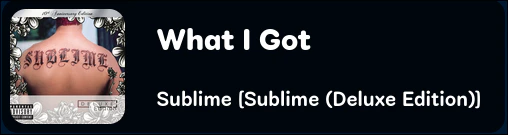
# Now Playing Card
> Displays the current song and album art in a card format
### Preview
##### The blue background is removed when used as a browser source
 ## Browser Source URL
```url theme={null}
http://localhost:1234/overlay/nowplaying
```
#### Browser Source Dimensions
#### URL Parameters
Aligns the card to the right side of the window
```url theme={null}
http://localhost:1234/overlay/nowplaying?right
```
Aligns the card to the left side of the window
```url theme={null}
http://localhost:1234/overlay/nowplaying?left
```
Omit parameter for middle alignment
```url theme={null}
http://localhost:1234/overlay/nowplaying
```
## Browser Source URL
```url theme={null}
http://localhost:1234/overlay/nowplaying
```
#### Browser Source Dimensions
#### URL Parameters
Aligns the card to the right side of the window
```url theme={null}
http://localhost:1234/overlay/nowplaying?right
```
Aligns the card to the left side of the window
```url theme={null}
http://localhost:1234/overlay/nowplaying?left
```
Omit parameter for middle alignment
```url theme={null}
http://localhost:1234/overlay/nowplaying
```